Description
This node-red example provides the solution to read Modbus INT64 type register through Milesight LoRaWAN controller.
Requirement
- Milesight Gateway: UG56/UG65/UG67
- Milesight LoRaWAN Controller (UC100/UC300/UC50x): This article will use the Milesight UC300 as an example
Configuration
Step 1: Enable the pass-through feature of the controller
Please refer to this article to enable the pass-through feature of the controller: How to use Modbus RS485 Bridge LoRaWAN Feature : IoT Support
Step 2: Launch Node-RED and Import Flow Example
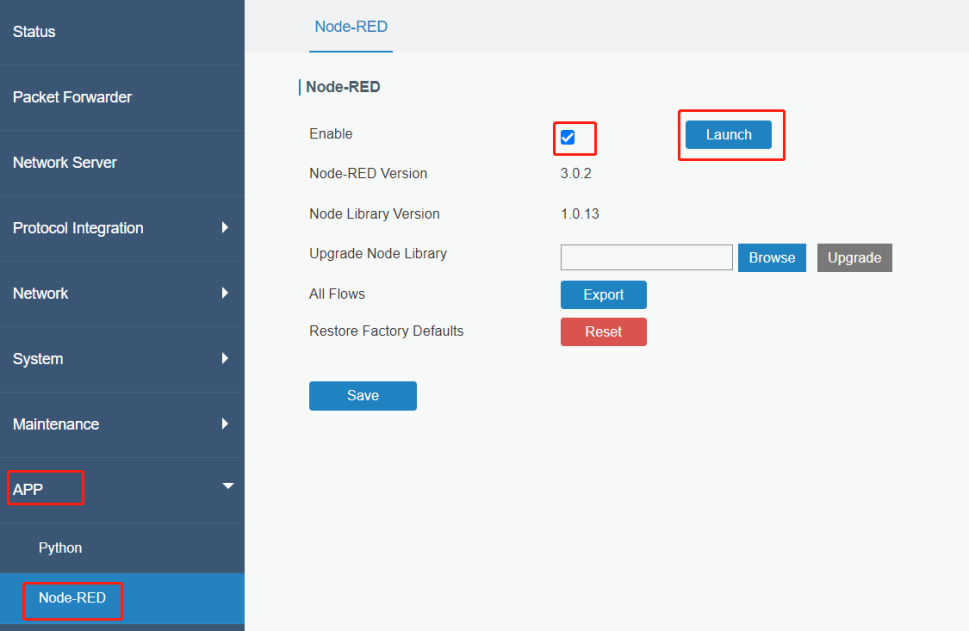
- 1. Go to App > Node-RED page to enable Node-RED program and wait for a while to load the program, click Launch button to start Node-RED web GUI.
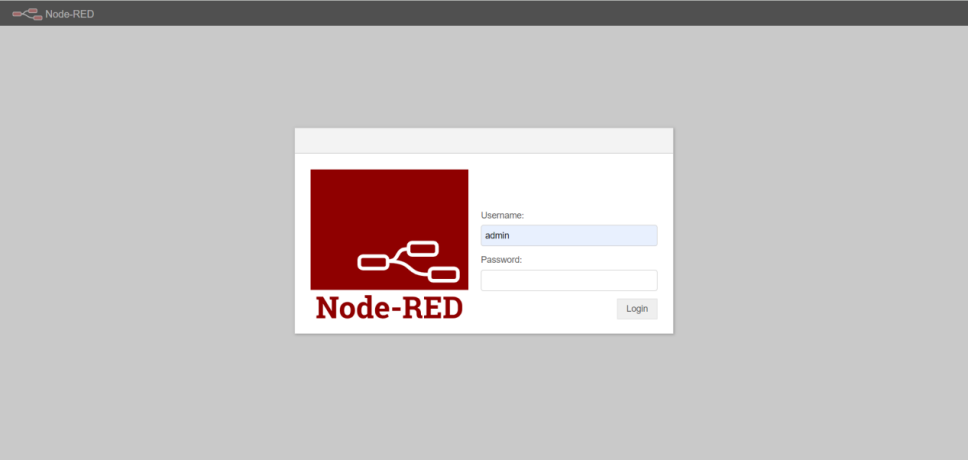
- 2. Log in the Node-RED web GUI. The account information is the same as gateway web GUI.
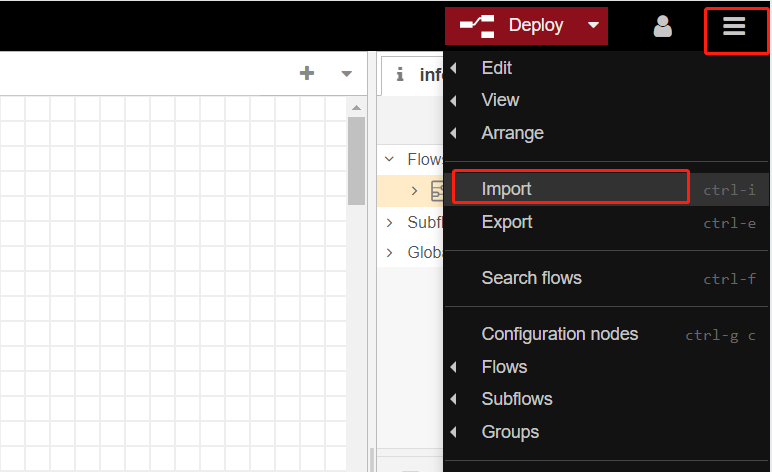
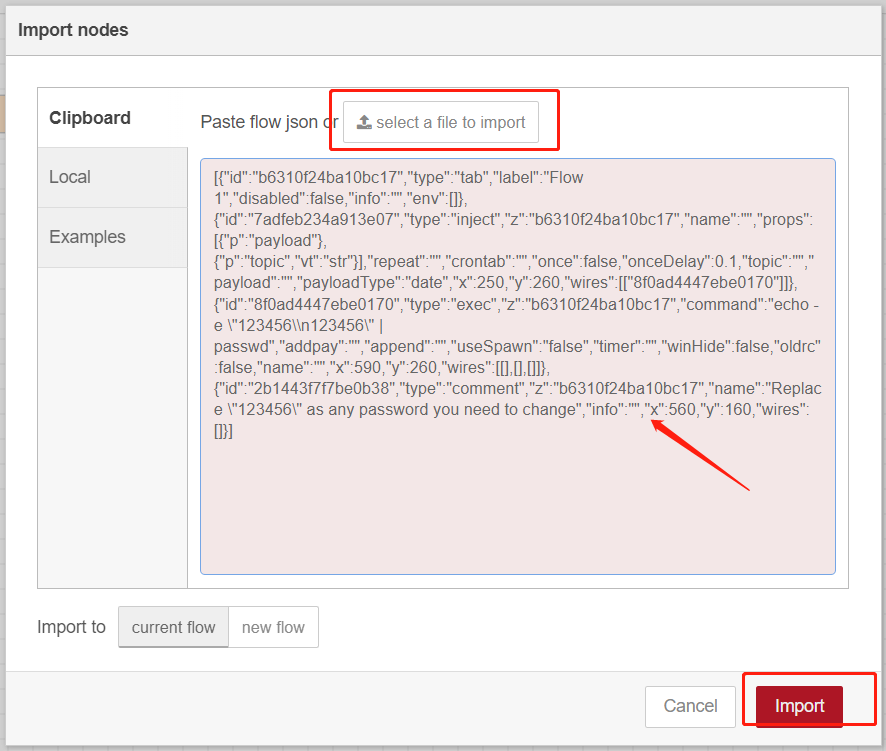
- 3. Click Import to import the node-red flow example by pasting the content or import the json format file.
Step 2: Node-RED Configuration
Flow structure:
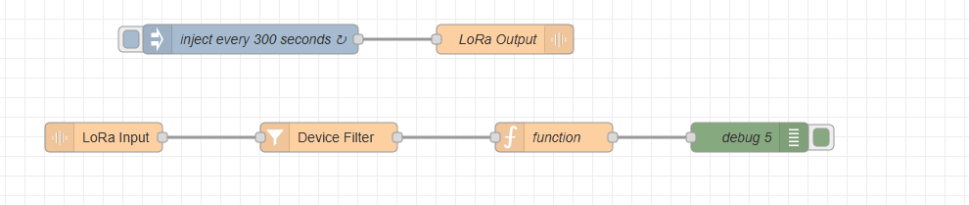
Content:
[{"id":"6791bad1501bb22a","type":"tab","label":"Flow 2","disabled":false,"info":"","env":[]},{"id":"338cd43473e9c97e","type":"LoRa Output","z":"6791bad1501bb22a","name":"send modbus command read register1 to 4","eui":"24E124445C195920","payloadType":"hex","payload":"0103000000044409","confirmed":true,"port":"126","x":690,"y":120,"wires":[]},{"id":"9286d28233ec9617","type":"inject","z":"6791bad1501bb22a","name":"inject every 300 seconds","props":[],"repeat":"","crontab":"","once":true,"onceDelay":"300","topic":"","x":330,"y":120,"wires":[["338cd43473e9c97e"]]},{"id":"fa5877e64e18a487","type":"LoRa Input","z":"6791bad1501bb22a","name":"","devEUI":"","extendedField":"","x":180,"y":220,"wires":[["22927f94ad9846da"]]},{"id":"22927f94ad9846da","type":"Device Filter","z":"6791bad1501bb22a","name":"","eui":"24E124445C195920","x":410,"y":220,"wires":[["dcdc9cc58b8da59a"]]},{"id":"dcdc9cc58b8da59a","type":"function","z":"6791bad1501bb22a","name":"Extracting values and combining","func":"// Function to combine four 16-bit registers into a single 64-bit value\nfunction combineRegisters(msg_payload_base64) {\n // Step 1: Decode the Base64 payload to raw bytes\n let payload_bytes = Buffer.from(msg_payload_base64, 'base64');\n\n // Step 2: Convert the raw bytes to a hexadecimal string\n let payload_hex = payload_bytes.toString('hex');\n\n // Step 3: Extract the values of the four registers from the hexadecimal string\n // Assuming the values are 16-bit and stored consecutively\n let register1_hex = payload_hex.slice(6, 10); // First 4 characters (2 bytes) for register 1\n let register2_hex = payload_hex.slice(10, 14); // Next 4 characters (2 bytes) for register 2\n let register3_hex = payload_hex.slice(14, 18); // Next 4 characters (2 bytes) for register 3\n let register4_hex = payload_hex.slice(18, 22);// Next 4 characters (2 bytes) for register 4\n\n // Convert the hexadecimal values to integers\n let register1_value = parseInt(register1_hex, 16);\n let register2_value = parseInt(register2_hex, 16);\n let register3_value = parseInt(register3_hex, 16);\n let register4_value = parseInt(register4_hex, 16);\n\n // Step 4: Combine the four 16-bit register values into a single 64-bit value\n // JavaScript doesn't handle 64-bit integers natively, so we'll use BigInt\n let combined_value = (BigInt(register1_value) << 48n) |\n (BigInt(register2_value) << 32n) |\n (BigInt(register3_value) << 16n) |\n BigInt(register4_value);\n // current byte order is ABCDEFGH\n return { combined_value, payload_hex, register1_hex, register2_hex, register3_hex, register4_hex };\n}\n\n// Example usage\nlet msg_payload_base64 = msg.payload; // Assuming msg.payload contains the Base64 encoded payload\nlet result = combineRegisters(msg_payload_base64);\n\n// Add the combined value, hex payload, and register hex values to the message\nmsg.combined_value = result.combined_value;\nmsg.payload_hex = result.payload_hex;\nmsg.register1_hex = result.register1_hex;\nmsg.register2_hex = result.register2_hex;\nmsg.register3_hex = result.register3_hex;\nmsg.register4_hex = result.register4_hex;\n\n// Set the payload to an object containing combined_value, payload_hex, and register hex values\nmsg.payload = {\n combined_value: result.combined_value,\n payload_hex: result.payload_hex,\n register1_hex: result.register1_hex,\n register2_hex: result.register2_hex,\n register3_hex: result.register3_hex,\n register4_hex: result.register4_hex\n};\n\nreturn msg;\n","outputs":1,"noerr":0,"initialize":"","finalize":"","libs":[],"x":710,"y":220,"wires":[["40d119dc08447a5a"]]},{"id":"40d119dc08447a5a","type":"debug","z":"6791bad1501bb22a","name":"debug 5","active":true,"tosidebar":true,"console":false,"tostatus":false,"complete":"payload","targetType":"msg","statusVal":"","statusType":"auto","x":1000,"y":220,"wires":[]}] |
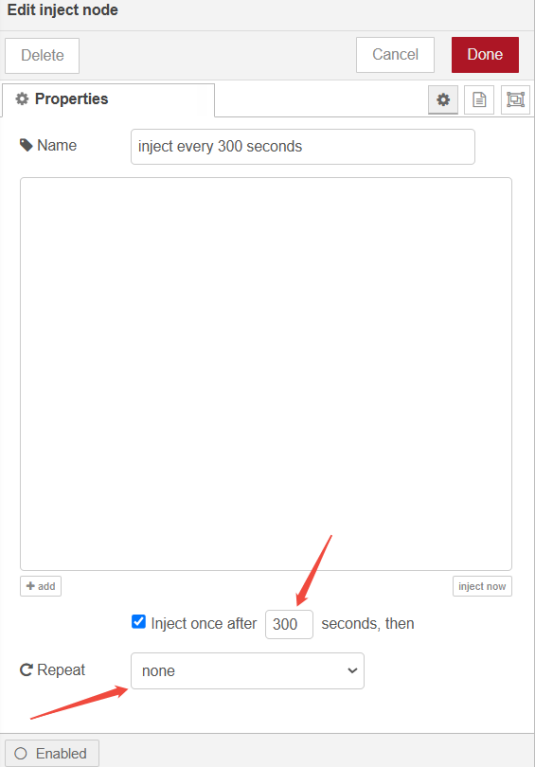
Inject Node: Setting the trigger time
LoRa Output Node: Send modbus command to modbus device, in this example, the command issued is to read the four registers at addresses 0-3
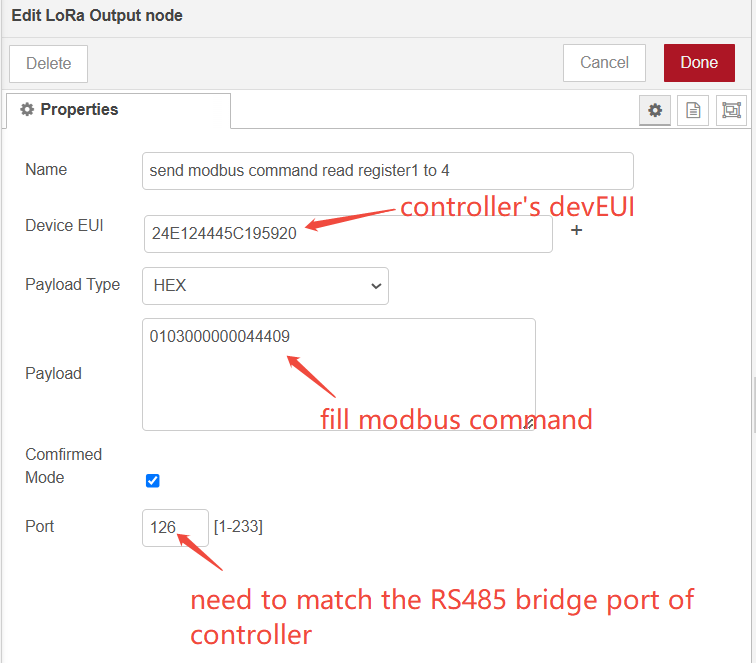
Modbus command example:
| Slave ID | Function | Address | Length | Parity |
| 0x01 | 0x03 | 0x00 0x00 | 0x00 0x04 | 0x44 0x09 |
LoRa Input Node: Receive LoRa packets
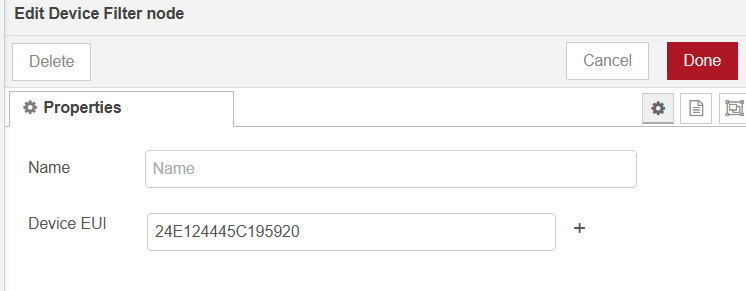
Device Filter Node: Filtering controller packets
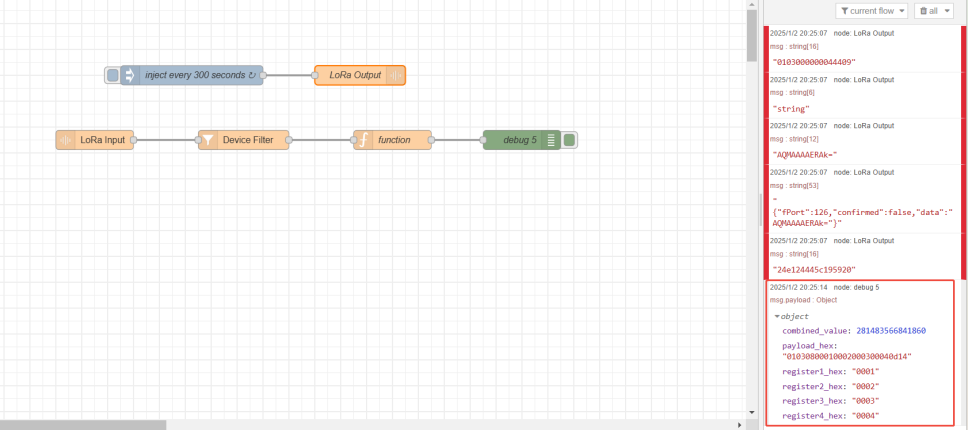
Function Node: Combine the received values of the four registers and output the values of each of the four registers.
Debug Node: Output results
Step 3: Deploy and Check Result
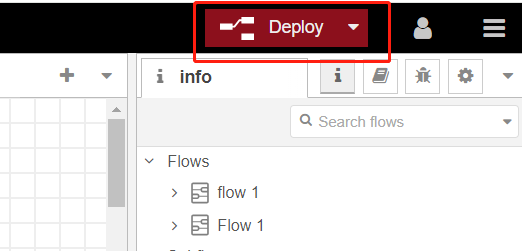
- 1. Click Deploy to save all node-red configurations.
- 2. You can send modbus commands manually by clicking on the button on the left side of the Inject node and then view the results on the right side
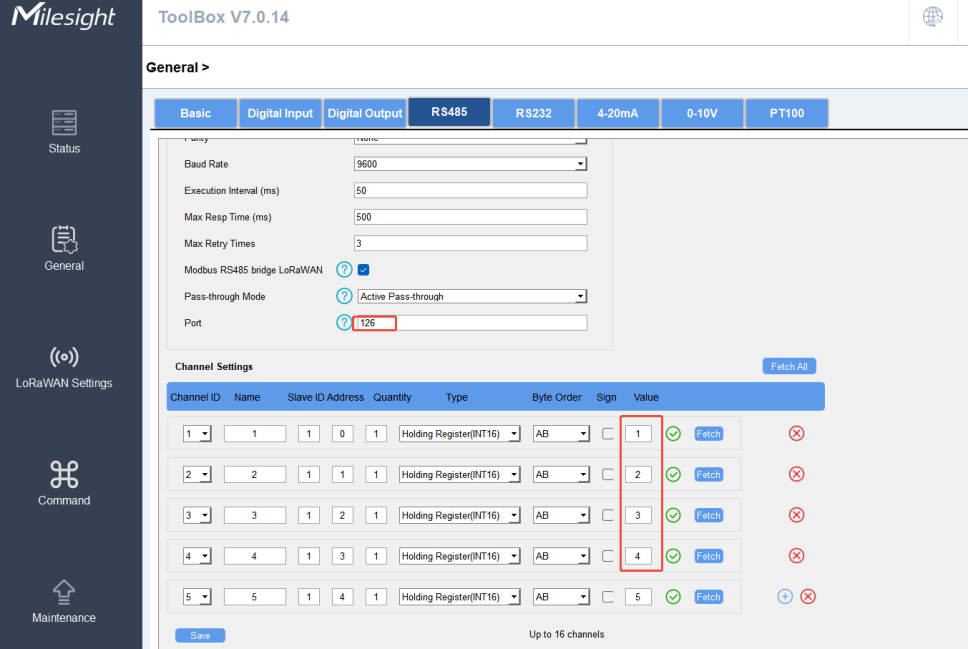
-------END-----
Was this article helpful?
That’s Great!
Thank you for your feedback
Sorry! We couldn't be helpful
Thank you for your feedback
Feedback sent
We appreciate your effort and will try to fix the article