Description
This article will describe how to make the UC50x display the AI value correctly on Milesight IOT Cloud.
Requirement
- Milesight UC50x
- Milesight IOT cloud account
Configuration
Step 1: Please add the UC50x to Milesight IoT Cloud and activate it.
Step 2: Please complete the Osh and Osl settings for the UC50x on Toolbox.
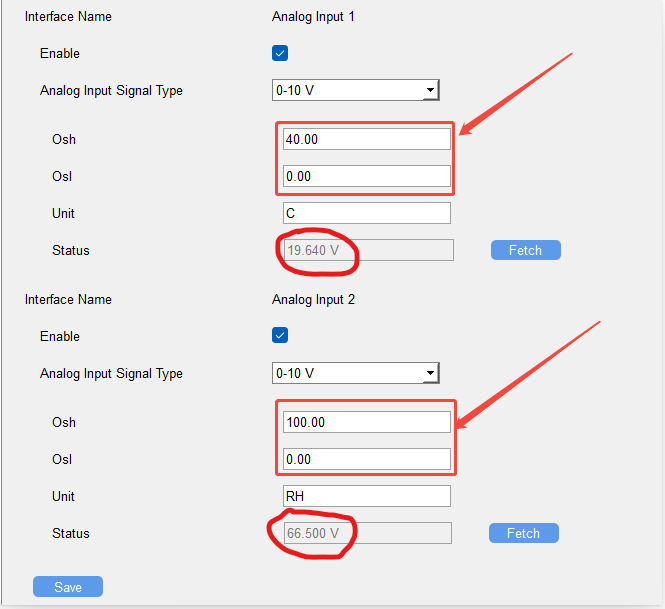
But do not use Toolbox to configure Osh and Osl on the UC50x.
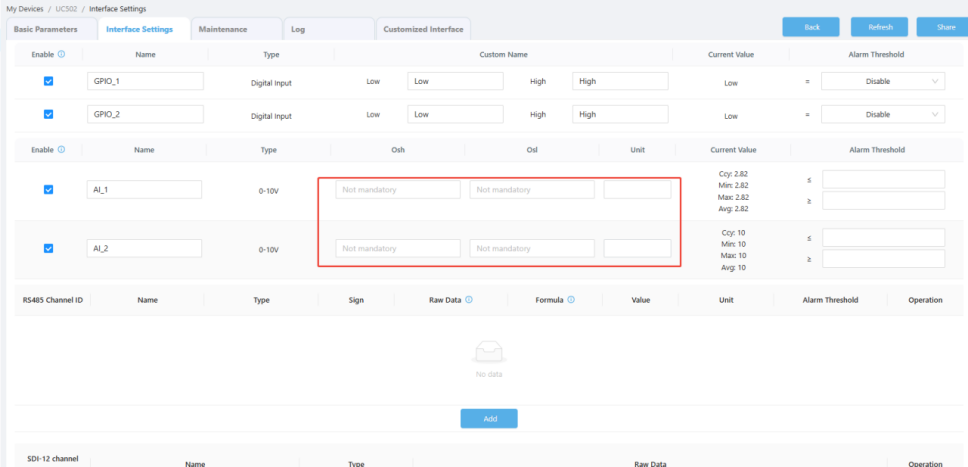
Note:Osh and Osl can only be configured in either the UC50x or Milesight IoT Cloud, not both at the same time. Otherwise, the values will be converted twice, which will result in incorrect values being displayed on Milesight IoT Cloud.
Was this article helpful?
That’s Great!
Thank you for your feedback
Sorry! We couldn't be helpful
Thank you for your feedback
Feedback sent
We appreciate your effort and will try to fix the article